
Accounts payable (AP) is an important part of financial operations. It ensures that money owed to suppliers is recorded and paid accurately and on time. For UK small businesses and limited companies, accounts payable affects cash flow control, supplier relationships and the accuracy of financial records used for reporting and tax filings.
As transaction volumes grow, many businesses find it harder to manage invoices, approvals and payment timelines in a consistent way. Delays, manual checks, and scattered records often make month-end and year-end work more time-consuming for accountants. Without a structured small business accounts payable process, owners can lose visibility over who is owed what and when, which increases the risk of cash gaps and supplier disputes.
This guide explains how accounts payable works, what a typical accounts payable process looks like, and how businesses can improve control using best practices and automation. It also covers:
- Core duties of accounts payable
- Common mistakes and how to avoid them
- Best practices for small businesses
- How automation and outsourced accounts payable services can help
By the end, you will have a practical understanding of accounts payable management and how an integrated accounts payable system with outsourced bookkeeping supports stronger financial control in a growing business.
Understanding Accounts Payable Process
The accounts payable process consists of a set of repeatable steps that ensure purchase obligations are recorded and settled correctly.
Step 1: Supplier Invoice Receipt
Invoices may arrive by email, post or online portal. All invoices should be logged promptly to avoid delays.
Step 2: Verification and Coding
This involves checking:
- Supplier details
- Correct invoice amounts
- Matching purchase orders or agreements
- VAT and tax information
At this stage, accounts payable invoice details are entered into the accounting system.
Step 3: Approval Workflow
Invoices are routed to authorised personnel for approval. Clear accounts payable duties within the team reduce bottlenecks.
Step 4: Recording and Scheduling Payment
Approved invoices are recorded and scheduled for payment according to agreed terms (for example 30 days).
Step 5: Payment and Reconciliation
Payments are made and then reconciled against bank statements to confirm accuracy.
Key Duties of Accounts Payable Teams
Understanding role clarity helps small businesses manage workflows more efficiently.
The following overview highlights the core responsibilities handled by accounts payable teams in day-to-day operations:
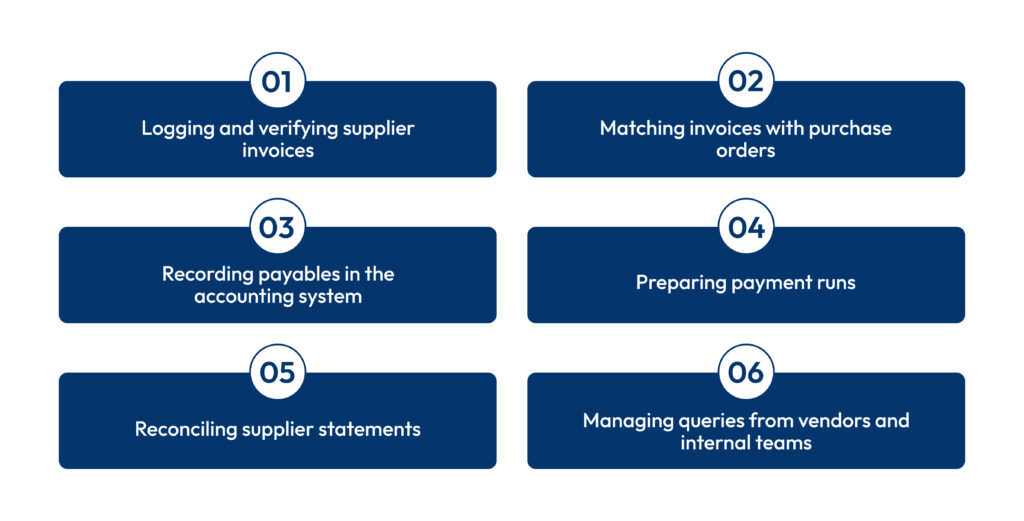
These tasks are part of standard accounts payable duties and form the backbone of healthy cash-flow control.
Typical duties of accounts payable include vendor onboarding, invoice verification, coding and posting, payment run preparation, handling supplier queries and keeping vendor statements reconciled.
In a small business accounts payable environment, the same person may handle several of these tasks, so written procedures and simple accounts payable software for small business become essential for consistency and risk reduction.
Common Accounts Payable Mistakes to Avoid
Errors in accounts payable can cause cash flow issues and damaged relationships.
| Mistake | Impact |
|---|---|
| Late invoice entry | Missed payment deadlines |
| Duplicate payments | Increased costs |
| Missing approvals | Compliance issues |
| Poor record keeping | Difficult audits |
| Manual data entry errors | Reduced accuracy |
| Incorrect coding to wrong expense accounts | Misstated financial reports and KPIs |
| Paying invoices before goods/services are received | Cash tied up, higher risk of disputes |
| Failing to update vendor bank details securely | Higher risk of fraud and misdirected payments |
Avoiding these mistakes forms part of accounts payable best practices for small businesses.
Best Practices for Accounts Payable
Improving AP operations means reducing manual work and increasing reliability. The following accounts payable best practices for small businesses are practical, low-cost steps that can be implemented even without a large finance team.
1. Centralise Invoice Intake
Collect all invoices in one digital location to reduce loss or duplication. This ensures all invoices are visible and tracked. A central inbox, shared folder or AP portal also gives outsourced accounts payable services for small businesses a single source of truth when supporting your team.
2. Standardise Processes
Define clear procedures for invoice processing and approval. Standardised workflows reduce confusion and errors. This includes setting cut-off times for invoice submission, defining who approves which spend levels and ensuring everyone understands the end-to-end accounts payable process.
3. Monitor Key Performance Indicators (KPIs)
Track metrics like:
- Days Payable Outstanding (DPO)
- Invoice processing time
- Error rates
KPIs help identify process bottlenecks and improvement areas.
Tracking “invoices processed per FTE”, percentage of invoices paid on time and number of exceptions per month gives a clearer picture of accounts payable management performance and where automation could deliver quick wins.
4. Train Your Team
Ensure everyone understands their role in your AP cycle. Training reduces mistakes and improves consistency. Refresher training on fraud red flags, supplier scams and updated accounts payable software features helps reduce errors in accounts payable and strengthens internal controls.
5. Maintain Vendor Communication
Supplier relationships benefit when payment terms and expectations are communicated clearly.
Agreeing written payment terms, preferred payment methods and escalation contacts with each supplier helps the accounts payable department resolve disputes quickly and maintain goodwill.
6. Go Paperless Where Possible
Moving to digital invoices and approvals reduces filing effort, supports remote work and makes it easier to search past accounts payable records during audits.
What is Accounts Payable Automation?
Accounts payable automation uses software to reduce manual steps in the AP process. Instead of manually entering invoice data and routing approvals, automation software digitises tasks and guides them through structured workflows.
Core benefits include:
- Faster invoice processing
- Fewer errors
- Better audit trails
- Improved cash-flow planning
- Stronger compliance controls
Automation provides visibility and control, freeing teams from repetitive tasks and allowing them to focus on exceptions and value-added work.
For small business accounts payable teams, automation is often the quickest way to scale volumes without hiring additional headcount, while still improving accuracy and control.
How Accounts Payable Automation Works?
1. Digital Invoice Capture
Software can extract invoice details automatically using optical character recognition (OCR). This removes manual data entry and reduces errors.
Modern accounts payable software for small business often supports email forwarding and mobile capture, making it easy for business owners and managers to submit invoices on the go.
2. Automated Matching
Automation tools match invoices with purchase orders and receipt confirmations. This speeds up approvals and reduces exceptions. Three-way matching between purchase order, goods received note and accounts payable invoice is one of the most reliable ways to prevent duplicate or fraudulent payments.
3. Workflow Routing
Invoices are routed automatically to the right approvers based on pre-defined rules. This speeds approvals and improves transparency. Rules can be based on supplier, department, project, spend value or type of expense, which supports clear segregation of duties of accounts payable approvers.
4. Vendor Self-Service Portals
Some systems allow suppliers to submit and track invoices online, reducing time spent on queries. Self-service also lets vendors update their own contact details and check payment status, freeing the accounts payable department from routine follow-up emails and calls.
5. Centralised Analytics
Automated AP systems provide dashboards and reports that show payment statuses, cash commitments and bottlenecks. These analytics highlight common accounts payable mistakes to avoid, such as late approvals or frequent coding changes, and support continuous process improvement.
Accounts Payable Best Practices with Automation
Automation alone doesn’t guarantee efficiency ‒ it needs good practices.
1. Establish Standard Operating Procedures
Define roles, approval limits and invoice handling steps. Clear SOPs help in-house teams and outsourced accounts payable services for small businesses follow the same rules, regardless of who is processing the invoice.
2. Integrate With Accounting Software
Automation should work with your existing accounts system to sync data. An integrated accounts payable system reduces duplicate data entry, keeps supplier balances up to date and ensures that your aged creditors report is always accurate.
3. Review Exceptions Promptly
Automatic matching flags discrepancies that need human intervention. Setting SLAs for resolving exceptions stops problem invoices from piling up and keeps the accounts payable process flowing smoothly.
4. Use Analytics
Build dashboards showing processing times and supplier behaviour to guide improvements.
Regularly reviewing these dashboards helps finance leaders decide whether to refine workflows, renegotiate payment terms or expand their use of accounts payable automation.
5. Maintain Vendor Master Records
Accurate vendor data reduces errors and simplifies reconciliations.
Strong vendor master controls – such as dual approval for bank detail changes – are critical accounts payable best practices for small businesses looking to minimise fraud risk.
Accounts Payable Software for Small Businesses
Small businesses can benefit greatly from automation tools built for lower volumes without complex ERP integrations.
| Category | What to Look For |
|---|---|
| Invoice Capture | OCR and mobile upload |
| Approval Routing | Custom workflow rules |
| Integration | Sync with accounting software |
| Reporting | Dashboards and insights |
| Security | Role-based access and audit logs |
Software that supports automated payment scheduling and alerts can help businesses avoid late payments and capture early payment discounts.
When choosing accounts payable software for small business, also consider ease of setup, quality of customer support, pricing model and whether the tool can grow with your future transaction volumes.
Conclusion
Accounts payable is a core function that records and manages what a business owes its suppliers, helping reduce errors, support accurate financial records and improve cash-flow management.
By following best practices and using automation where appropriate, businesses can cut manual effort, improve accuracy and strengthen vendor relationships. Whether you handle AP in-house or through outsourced accounts payable services, clear procedures and the right technology make payables easier and more reliable, and outsourced accounts payable services for small businesses can provide specialist expertise and stronger controls without the cost of a full in-house team.
If your accounts payable process is causing delays or errors, it may be time to map your current workflow, identify bottlenecks and consider whether automation, better software or an experienced outsourcing partner could help streamline operations and reduce errors in accounts payable.
FAQs
What is accounts payable?
What are common accounts payable mistakes?
How does accounts payable automation help?
Should small businesses automate accounts payable?
Is accounts payable the same as expenses?

Parul is a content specialist with expertise in accounting and bookkeeping. Her writing covers a wide range of accounting topics such as payroll, financial reporting and more. Her content is well-researched and she has a strong understanding of accounting terms and industry-specific terminologies. As a subject matter expert, she simplifies complex concepts into clear, practical insights, helping businesses with accurate tips and solutions to make informed decisions.